Free full-featured capturing tool
When it comes to grab an image on your scree all you really need is an easy, efficient capturing tool that enables you to do the job in almost no time. And if it also features some nice effects and filters, what else could you ask for?
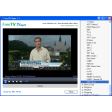
This is what you get with EasyCapture: a handy capturing utility that includes all the tools you need to capture anything on your screen, from a tiny user-defined area to the whole desktop. You can use hotkeys for capturing and also open as many images as you want on the program's tabbed interface. Plus it includes some basic effects that you can easily apply on your photos. They may not be as powerful as Photoshop's filters, but they'll do the trick.
But what I specially like about EasyCapture is the ability to add clipart to the images. You can highlight text with a virtual marker, use rectangular shapes and arrows to draw attention to certain elements in the captured image, insert text fields and also fun text balloons to add annotations. Each one of these tools has its own settings to configure size, color and other elements.
EasyCapture has some flaws, that's true. For instance, the scrolling window capture mode didn't really work (it didn't scroll the window completely). Also, the Text tool doesn't show up changes in real time when you're editing the text, which is kind of annoying. But in general terms I found this to be an excellent capturing tool for an unbeatable price.
Capture anything on your screen and edit it with filters, effects and some fun clipart.






















User reviews about EasyCapture
by Anonymous
If fixed can be great.
The version 1.2.0 has potential but the 2 main functionalities don't work properly
Pros: You can manage a lot of pictures
It's full of snap features if they work :-(
it has a decent amount of photoshop effects (except the most important, the compression :-()
Cons:
The scrolling feature doesn't work
The region feature is not usable with the touchpad. When ever you stop resizing the picture is taken. This is an easy fix for the developers
Among the effect it miss the jpeg settings feature More
by Anonymous
This will create a better 3D look to my images..
Just downloaded it looks like I'll be able upload images from my FireShot or Snagit easy enough. Great Job . Thanks Pros:
Easy to use Work great with my other software. More
by Anonymous
EasyCapture.
That croping device is awsome! Any picture or text on the
web can be snipped in just a click and it is save ready to save, send, print or just keep in your photos or documents. More
by Anonymous
EasyCapture Review.
Love this program. Easy to use. Easy to enhance documents captured to create the quality and readability of documents.
by Anonymous
Great Program.
Easy Capture's the cats meow. Works great and has lots of flexibility. One of the best freeware programs I've seen in a long time. Works great on Win 7 64.
Pros:
Easy screen captures. Has nice cropping tool too.
Cons:
Looking for 'preferences' but haven't found anything like that. I'd like to set default to save-as JPG versus BMP. Just kind of a minor inconvenience. More
by Anonymous
As name says. Its really easy n cool.
I have been using ZapGrab for about 5 years and then had to abondon it for license issues. Now , this solved the problem. Thanks for everyone in getting this done More